Hello,
I am testing the latest version of Matomo with an OroCommerce application. So far, my implementation seems to work quite well, but I am having a problem with tracking orders.
In the “E-Commerce → Overview” section, the data is showing correctly, as well as the data in the Order Action and many other places:
(Unable to upload more than one image in a post as a new user, see description of the image below)
The Overview section shows:
- 6 Orders
- 12.436 € income
- etc.
However, some reports are showing totally wrong values, such as this one:
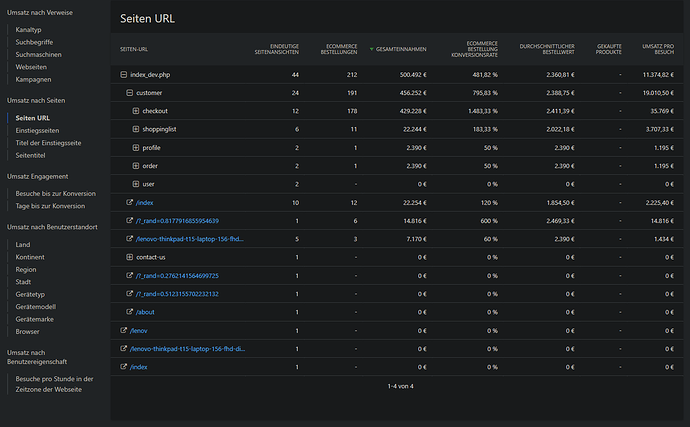
It seems that it tracks way too many orders in some reports while in others, it’s perfectly fine.
I am unable to find the reason for this behavior. What did I miss here?
The tracking code for Matomo is placed at the end of the <head> tag in the main twig template of my OroCommerce app, which renders it on every page. Here is the implementation:
        <!-- Matomo -->
        <script type="text/javascript">
            var _paq = window._paq = window._paq || [];
            {% set session = app.session %}

            {% if app.user %}
                _paq.push(['setUserId', {{ app.user.username|json_encode|raw }}]);
                {% set isLoggedIn = true %}
                {% set sessionVariable = 'isLoggedIn' %}
                {{ session.set(sessionVariable, isLoggedIn) }}
            {% elseif  not app.user and session.get('isLoggedIn') is defined and session.get('isLoggedIn') == true  %}
                {% set isLoggedIn = false %}
                {% set _ = app.session.remove('isLoggedIn') %}
                // User has just logged out, we reset the User ID
                _paq.push(['resetUserId']);
                // we also force a new visit to be created for the pageviews after logout
                _paq.push(['appendToTrackingUrl', 'new_visit=1']);
                _paq.push(['trackPageView']);
                // we finally make sure to not again create a new visit afterwards (important for Single Page Applications)
                _paq.push(['appendToTrackingUrl', '']);
            {% endif %}

            _paq.push(['setConversionAttributionFirstReferrer', false]);
            _paq.push(['addDownloadExtensions', "webp"]);
            _paq.push(['trackPageView']);
            _paq.push(['enableLinkTracking']);
            (function() {
                var u="//matomo.local/";
                _paq.push(['setTrackerUrl', u+'matomo.php']);
                _paq.push(['setSiteId', '2']);
                var d=document, g=d.createElement('script'), s=d.getElementsByTagName('script')[0];
                g.async=true; g.src=u+'matomo.js'; s.parentNode.insertBefore(g,s);
            })();

        </script>
        <!-- End Matomo Code -->
The tracking of the order is happening in the twig template which shows the order success page. Here is the code snippet:
    {% for item in order.lineItems %}
        <script type="text/javascript">
            // Product Array
            _paq.push(['addEcommerceItem',
                "{{ item.productSku }}", // (required) SKU: Product unique identifier
                "{{ item.productName }}", // (optional) Product name
                "{{ item.product.category.denormalizedDefaultTitle }}", // (optional) Product category. You can also specify an array of up to 5 categories eg. ["Books", "New releases", "Biography"]
                {{ item.price.value }}, // (Recommended) Product Price
                {{ item.quantity }} // (Optional - Defaults to 1)
            ]);
        </script>
    {% endfor %}

    <script type="text/javascript">
    _paq.push(['trackEcommerceOrder',
        "{{ order.id }}", // (Required) orderId
        {{ order.total }}, // (Required) grandTotal (revenue)
        {{ order.subTotal }}, // (Optional) subTotal
        {{ order.subTotal / 100 * 19 }}, // (optional) tax
        {{ order.estimatedShippingCostAmount }}, // (optional) shipping
        {{ order.discounts|length }} > 0 ? true : false // (optional) discount
    ]);
    </script>
Thanks in advance.
Kind regards,
Leo1
1 post - 1 participant